Run every coding agent you pay for
on your own server

Manta puts Claude Code, Codex and opencode on a Linux box or Mac you own: your existing subscriptions, running side by side, reachable from your desktop and your phone. Setup takes two minutes.

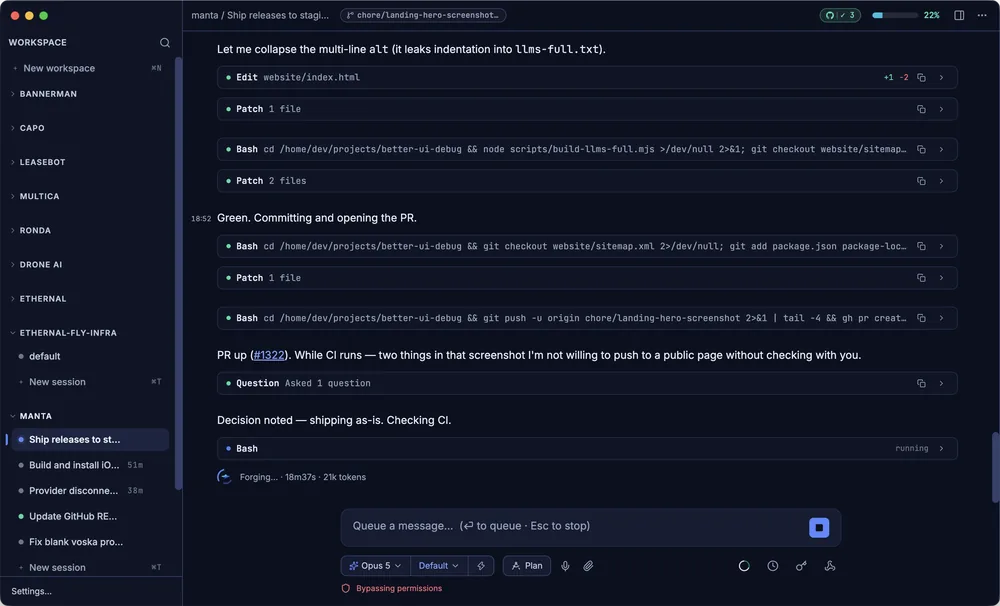
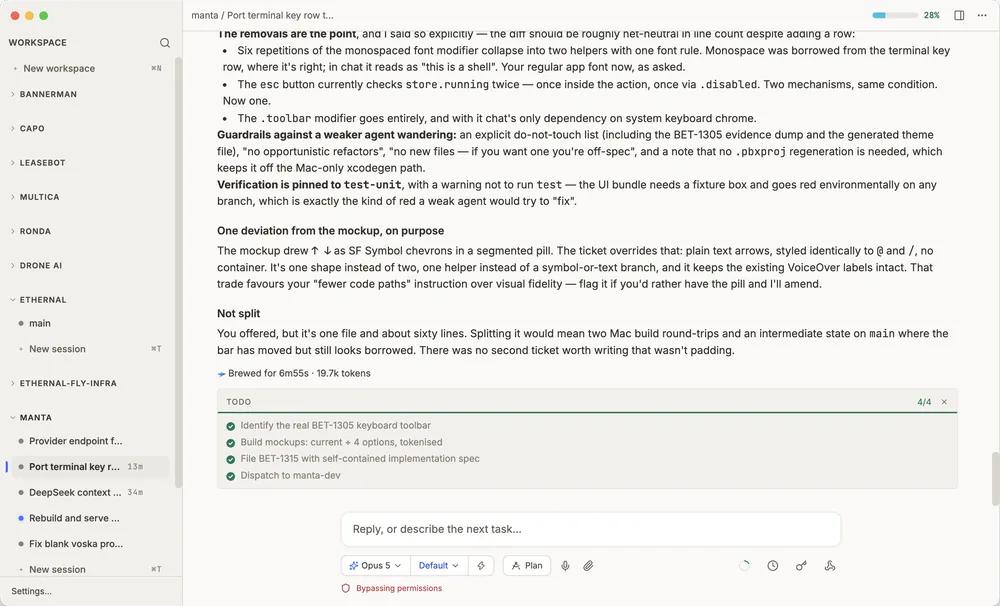
Manta UI on macOS: a workspace sidebar listing projects and their sessions, next to an agent transcript, a completed task checklist and the reply composer. Manta UI on macOS: a workspace sidebar listing projects and their sessions, next to an agent transcript, a completed task checklist and the reply composer.
Bring your own subscriptions
Claude CodeCodexopencode Kimi+ any CLI agent

All your subscriptions, remote

Claude Max, ChatGPT Pro, Kimi: logged in once on the server and running side by side, in one searchable place.

Runs on hardware you own

A VPS, a spare Mac mini, a home server. Your code, your keys and every transcript stay on the box. Nothing routes through us.

Open source, MIT

Client and server, every line readable on GitHub. No account to create and no hosted tier waiting to upsell you. Telemetry is optional: the box sends nothing unless you set a token.

Two-minute setup

Point the app at a server, it installs itself and hands you a six-digit code. Type the code on your phone and you are done.

Setup

Two minutes, and you
never touch it again

No terminal, no keys to copy, no tunnel to configure, no ports to forward. The desktop app does the whole install over SSH.

1

Enter your server

Pick a machine from your SSH config, or type a host. Any always-on Linux box or Apple Silicon Mac works.

2

It installs and pairs itself

Its own runtime, a system service, a certificate: no system packages touched. Ends with a six-digit code.

3

Connect your subscriptions

Log each agent CLI into the plan you already pay for, once. Every device you pair sees all of them.

Install on a fresh VPS takes about two minutes, start to finish

Where should your agents run?

Manta found these in your SSH config. It installs everything itself.

hetzner-box  Ubuntu 24.04, always on 157.90.224.92
mac-mini  macOS, Apple Siliconlocal network
Another machinehost or IP
runtime installed node 24, no system packages touched
manta-server running 127.0.0.1:8787
reachable over HTTPS certificate issued
› waiting for a device…
Pairing code
419207
Type it on your phone
to add it too.
What you get

A real client, not a status screen

Everything below works the same on the desktop app, in a browser, and on the iPhone app.

Readable transcripts

Diffs inline, tool calls collapsed, live command output as it streams. Not a terminal you have to squint at.

Approve from anywhere

When an agent asks to run something, you get a button: on whichever device you happen to be holding.

Notifications that find you

Desktop while you are at the machine, phone push once you walk away. Never both, never for something you are watching.

Real tmux underneath

Every session is a genuine tmux window. SSH in alongside Manta whenever you want; it is the same box.

Parallel worktrees

Delegate long jobs to background agents, each in its own git worktree and branch. They never touch your checkout.

Search every session

One query across the full history of every conversation on the box, whichever agent produced it.

Voice, files and screenshots

Dictate a prompt, drag a file onto a session, paste a screenshot. It lands on the server, not in a cloud bucket.

Scheduled and triggered work

Run a prompt on a cron, or let CI wake a session by webhook. Work that starts without you being there.

Secrets stay secret

Hand an agent a token by reference, never by value. It uses the credential without it entering the transcript.

Open source

Nothing to trust us with

Manta is MIT licensed, client and server. There is no Manta account and no hosted tier. Telemetry is an optional log-shipper that sends nothing unless you set a token. Read the code, build it yourself, and run it with no connection to us at all.

  • Your transcripts, uploads and secrets never leave the box
  • The only outbound traffic is your agent calling its own provider
  • No per-seat pricing, because there are no seats
antoinedc/MantaUI
TypeScript & SwiftMIT
Desktop, server & iOSone repo
Self-updating boxesno lock-in
$ curl mantaui.com/install.sh | bash
FAQ

Questions people actually ask

Can I use my existing Claude and Codex subscriptions?

Yes. You log each agent CLI into your own plan once on the server, and Manta runs them side by side. No Manta account, no proxy, no per-seat fee.

How long does setup actually take?

About two minutes. Point the desktop app at a server and it installs the runtime, starts the service, gets a certificate and shows a six-digit pairing code for your other devices.

Does the agent keep running if I close my laptop?

Yes. Agents live in tmux sessions on the box as system services. Clients are disposable; close them all and the work continues, with full history when you reconnect.

What kind of server do I need?

Any always-on Linux box or Apple Silicon Mac. A five dollar VPS is enough. The installer touches no system packages and brings its own runtime.

Does my code leave my box?

No. Transcripts, uploads, secrets and config stay on the machine. The only outbound traffic is your agent talking to its own provider.

Do I need Tailscale, a VPN or port forwarding?

No. If Tailscale is already running, devices connect over your tailnet. If not, the box gets its own hostname and certificate. Either way, nothing to port-forward.

Is Manta really open source?

Yes: MIT licensed, client and server both. Read every line, build it yourself, run it with no connection to us. No account, no hosted tier. Telemetry is optional and sends nothing unless you set a token.

Is this an alternative to Conductor or Orca?

They overlap on a different bet. Those run agents on your Mac; Manta runs them on a server you own and gives every device the same window onto the work.
Get started

Install the app, point it at a box

The desktop app sets the server up for you. If you would rather do it yourself, one command does the same thing.

macOS
Manta-latest.dmg

Apple Silicon, macOS 13 and up. Signed and notarised.

Download
Windows
Manta-latest-x64.exe

Windows 10 and 11, 64-bit.

Download
iPhone
TestFlight

Native app. Pairs with the six digits the desktop shows.

Available on iPhone

Go to bed. It will be done.

Free, open source, and it runs on hardware you already own.

Download for macOS